The New Item option in the File menu allows you to add a new item from the list of choices.
The list includes:
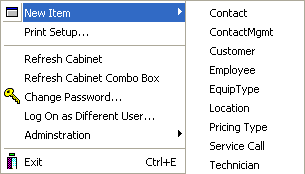
Once you choose an item from the list, the form for that item will open. You then can enter the appropriate text.
Note: From the Toolbar, you can also use the New button to accomplish this; more information can be found here.
Useful Links:
Entering a New Contact
Entering a New ContactMgmt
Entering a New Customer
Entering a New Employee
Entering a New EquipType
Entering a New Location
Entering a New Pricing Type
Entering a New Service Call
Entering a New Technician